
|

|

|
Machine Language! |
|
|
|
|
I spent most of the last entry trying to dispell some of the mystery surrounding computers by convincing you that we can get logic gates to perform basic arithmetical and logical operations. Now I'd like to present a model of computation called the register machine model that makes use of this cability to run entire programs (the register machine model and its many variants are derived from the so-called von Neumann architecture whose logical design provides foundation for most modern computers).
A register machine consists of a memory, a Central Processing Unit (CPU) and a pathway or bus for moving data from memory to the CPU and back. The CPU is constructed from a bunch of registers that are used to keep track of operands, results and other useful information, an Arithmetic and Logic Unit (ALU) (which we talked about on Monday) and some control logic that implements the basic loop governing the execution of programs.
Here as elsewhere, I'll be introducing abstractions that will allow us to emphasize some things while ignoring others. Typically explanations of complicated devices proceed by adding detail and introducing complexity. If you're not careful you'll get overwhelmed by the detail. Astractions require that you ignore some details - they are said to "abstract away" or "sweep under the rug" details that are not immediately important. The process of abstracting away generally requires that you accept certain assumptions about what's possible and that you choose to describe certain operations without being concerned with the detailed consequences. That's the game we're playing here; include the important details so that the models are satisfying and useful but abstract away the extraneous details so that you don't become overwhelmed. Of course, one person's important details are someone else's extraneous details - as I said it's a game.
We've already seen one type of memory in the form of the registers that are used to temporarily store operands and results in performing basic operations like addition and multiplication. Registers of this sort play an integral role in register machine model as you might of guessed from the name; however, when we speak about memory in the context of the register machine model, we're talking about something separate - a place to store lots of stuff for longer periods of time. In the abstraction used in the register machine model for talking about memory, there are a set of locations such that each location has an address and contents. The addresses are generally assumed to be arranged consecutively as the natural numbers 0 through M (of course, we'll represent addresses internally as binary numbers but that's a detail at this level of abstraction). The content of each location is an integer between 0 and N (also represented as a binary number). This model of memory is the random access memory (RAM) model which assumes that we can access the contents of any location in memory by simply referring to its address. If we have 1 megabyte of RAM (remember that 1 megabyte is 210 = 1024 kilobytes where a kilobyte is 210 bytes and a byte is 8 bits) then M is (1020 - 1) and N is (28 - 1) = 255. If K is the address of a location in RAM and K is a number greater than or equal to 0 and less than or equal to (M - 1), then (K + 1) is the next consecutive address in RAM.
There are lots of details concerning how memory is implemented that we'll gloss over. For example, static RAM (SRAM) is implemented using the sort of latches and flip-flops that we used to construct registers. Dynamic RAM (DRAM) is implemented with fewer transistors by using capacitors to store a charge that determines whether a memory cell is interpreted as containing a logical 0 or 1; the charge leaks away however and so DRAMs have to be periodically refreshed (the dynamic part) complicating their implementation and use somewhat. There are also the intricacies of using decoders and multiplexors to address a large RAM; very interesting stuff, but we'll ignore these details. Ditto for the details of implementing the various pathways or busses that are used to make possible transfers to and from memory. We'll assume that if we have the address of a location in memory then we can either store a number in that location or read the current contents of that location.
Specifically, if we have the address of a location in RAM in a register of the ALU, then we can store the current contents of the location in RAM in some other register in the ALU - this corresponds to reading from memory and is called "loading (the contents of) a register from memory". In addition, if we have the address of a location in RAM in a register of the ALU, then we can store the current contents of some other register in the ALU in the location in RAM pointed to by this address - this corresponds to writing to memory and is called "storing (the contents of) a register in memory". That's pretty much it for our abstraction of memory. We're ignoring other forms of memory such as those involving magnetic and optical disks and tape drives.
The contents of memory are intepreted differently depending on the context. In some circumstances, the CPU will interpret the contents of a location in memory as an instruction corresponding to one of three types: either a primitive arithmetical or logical operation to be performed by the ALU, an instruction to move information between RAM and the registers of the CPU, or a conditional indicating a test and what to do based on the results of the test. In other cases, it might interpret the contents of a location as an address or part of an address for a location in memory. In still other cases, it might interpret the contents of a location as data to be used as operands for arithmetical or logical operations. If the registers are large enough, then the CPU may look at their contents as segmented into two or more fields so that, for example, the first five bits would be interpreted as a code for an instruction or basic operation, the next five for an operand or an address, the next five ... well, you get the idea; there all sorts of strategies for organizing memory. The CPU also includes a special register called the program counter (also called the instruction address register). The program counter is used to keep track of where the CPU is in executing a program stored in RAM. We'll assume (without loss of generality, as the mathematicians like to say) that when the computer is first started the program counter contains the address of the first location in memory.
The basic loop governing the operation of the CPU is as follows. The CPU interprets the contents of the location in memory pointed to by the address in the program counter as an instruction and does whatever the instruction requires, e.g., loading registers from memory, storing the contents of registers in memory, adding the contents of two registers and placing the result in a third register, etc. There is also an important set of instructions called jump and branch instructions that can modify the contents of the program counter. For example, a jump instruction might specify an address (or a register containing an address) to load into the address counter. A branch instruction typically specifies a test and an address to load into the address counter if the test is positive. The test might be whether or not the number stored in a register is zero. If the contents of the program counter are not changed by a jump or a branch instruction, then the CPU increment the contents of the program counter by one so that the program counter now points to the next location in memory. The jump and branch instructions and the default mode of incrementing the program counter govern the flow of control in programs allowing for loops, procedure calls, conditionals and much more.
The machine language for a particular computer is a language of binary codes that can be directly interpreted by the hardware comprising the CPU. The CPU looks at the bits stored in memory and interprets them as codes for instructions, memory addresses and registers. Writing in machine language is painful because it's very difficult for us to keep track of what all the bits mean. That said it's instructive to look at a simple program in order to get a better appreciation of what's going on in the CPU. Let's consider a simple program for controlling a mobile robot.
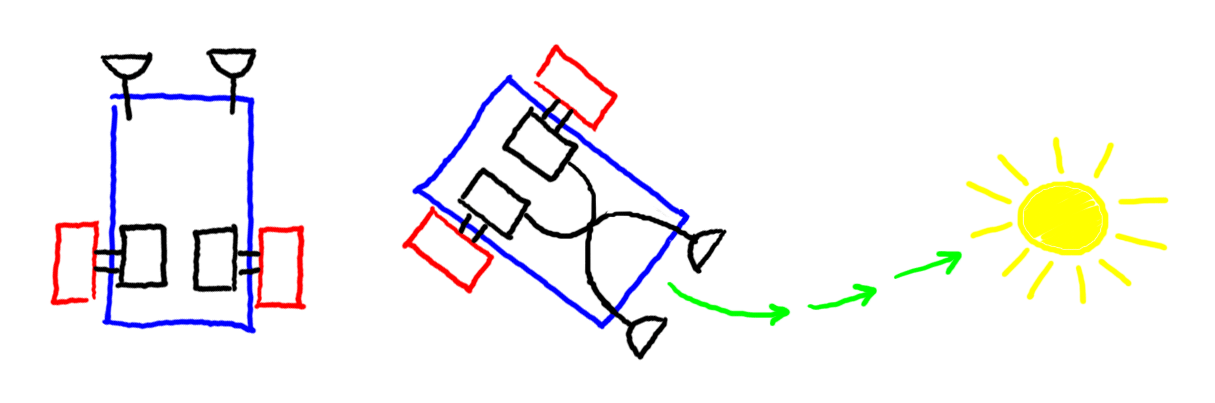
The following image depicts a very simple mobile robot consisting of a rectangular body, equipped with two wheels each attached to a motor and two sensors that are able to sense light. We're looking at the robot from above. This robot is adapted from Valentino Braitenberg's book, "Vehicles: Experiments in Synthetic Psychology" [Braitenberg, 1986]. In Braitenberg's book, the sensors were wired directly to the motors as shown on the right with the assumption that the sensors generate current that can drive the motors; the more light falling on the sensor, the more current and the faster the attached motors turns. If the motors and sensors are configured exactly right then the robot will tend to first turn toward and then drive directly at a stationary bright light.
|
Instead of wiring the sensors and motors together we're going to assume that we have a small computer that's mounted on the robot and that can read from the sensors and control the motors. The interface between the computer and the motors and sensors is similar to the interface used in the Lego Mindstorms robots. As far as the programmer is concerned, the current value of a sensor is always available in a particular location in memory; external circuitry makes sure this happens. Programs read from the memory locations reserved for sensors but don't write to them. In addition, each motor has a memory location assigned it which is interpreted by the external hardware as a measure of how much power to apply to the motor. So for our two-motor, two-sensor robot there are four locations set aside in memory; one for each sensor that a program reads from and one for each motor that a program writes to in order to control the motor.
A simple program that exhibits the light-seeking behavior described above works as follows. The method is called bang-bang control because the devices to be controlled, motors in this case, are either on or off, there's no middle ground. The method is a little crude but it works very effectively. The program first checks to see which of the sensors is receiving more light; if the left sensor is receiving more, then it turns on the right motor and turns off the left and if the right sensor is receiving more, then it turns on the left and turns off the right. Then it loops and does the same thing over again until the batteries lose their charge or someone shuts the computer off. In order to write this program, we need to imagine a simple computer.
We'll assume that our computer has four registers: the program
counter, register 1, register 2 and register 3. We'll use decimal
numbers instead of binary numbers to make things a little simpler to
understand. Assume that we have 100 memory locations with addresses
00 to 99 Suppose that each register and each location in memory is
large enough to store a signed (+ or -) four digit number. Our
computer will support the following instructions described here along
with the exact way that the instructions are appear in memory along
with any necessary register or address information. Obviously a real
computer would have an ADDition instruction as well as
SUBtraction instruction but I'm lazy and so I'm only
including the instructions that I need to write this simple
program. Note that in each case, the left-most digit of an instruction
codes for the type of instruction (called the opcode) and the remaining digits
specify registers and addresses as needed.
SUBtract the contents of register i from the
contents of register j and store the result in register
k; a SUB instruction looks like
1ijk, e.g.,
1123 subtracts register 1 from register 2 and
stores the result in register 3.
JUMP to location - change the program counter
(instruction address register); an ADD
instruction looks like 20mm where
mm is a two-digit base-10 number indicating an address,
e.g., 2099 jumps to location 99.
BRANCH - if the number in register n is greater
than zero then jump to location mm a
BRANCH instruction looks like 3nmm,
e.g., 3199 jumps to location 99 if the contents
of register 1 is greater than zero otherwise the program
counter is incremented as usual.
LOAD the contents of memory location mm into
register n; a LOAD instruction looks like
4nmm.
STORE the contents of register n in location
mm; a STORE instruction looks like
5nmm
Now we write machine code to drive a Braitenberg light-seeking robot. Assume that the right and left sensors write their sensor readings into locations 01 and 02 respectively, and that locations 03 and 04 are read by the right and left motors respectively thereby determining the power available to the motors. Initially these four location will be zero. I've also stored the value 0000 in memory location 05 and the value 0100 in memory location 06 as it will be convenient to have these constants available for setting the power to the right and left motors. Note that loading a machine language program into memory is pretty straightforward. Here is what memory looks like with the program loaded but prior to the computer starting operation.
00      01      02      03      04      05      06      07      08      09
2007    0000    0000    0000    0000    0000    0100    4011    4022    1123
10      11      12      13      14      15      16      17      18      19
4105    4206    3316    5103    5204    2007    5104    5203    2007    0000
If the above listing seems pretty inscrutable then you have some idea
why hardly anyone programs in machine language anymore. We can
improve on readability a little by listing the program one instruction
to a line followed by some useful commentary but in a long program
it's difficult to keep track of all the locations and what they're
used for. In the following listing, comments follow the sharp
(#) sign:
00      2007      # jump past the locations for sensors and constants
01      0000      # read the right sensor value at this location
02      0000      # read the left sensor value at this location
03      0000      # write the right motor power level here
04      0000      # write the right motor power level here
05      0000      # store the constant for zero power level here
06      0100      # store the constant for full power level here
07      4011      # load the right sensor value into register 1
08      4022      # load the left sensor value into register 2
09      1123      # subtract register 1 from 2 and store the result in 3
10      4105      # load the "motor off" constant into register 1
11      4206      # load the "motor on" constant into register 2
12      3316      # if the right sensor is greater than the left sensor
13      5103      # then turn the left motor on
14      5204      # and turn the right motor off
15      2007      # and then jump to the beginning of the loop
16      5104      # else turn the right motor on
17      5203      # and turn the left motor off
18      2007      # and then jump to the beginning of the loop
19      0000      # this location is not used by the program
Assembly language is a little easier to write programs in, but only a little. In assembly language, instructions are given mnemonic (easily remembered) names and we're allowed to use symbolic addresses for memory locations. An assembler is a program that converts an assembly language program into machine language. Among other bookkeeping tasks, the assembler figures out the machine addresses for all of the symbolic addresses. Here is an assembly language version of the above machine code:
START:  JUMP    LOOP            # jump past the locations for constants
RSV:    0000                    # read the right sensor value at this location
LSV:    0000                    # read the left sensor value at this location
RMP:    0000                    # write the right motor power level here
LMP:    0000                    # write the right motor power level here
OFF:    0000                    # store the constant for zero power level here
ON:     0100                    # store the constant for full power level here
LOOP:   LOAD    1       RSV     # load the right sensor value into register 1
        LOAD    2       LSV     # load the left sensor value into register 2
        SUB     1   2   3       # subtract register 1 from 2 and store in 3
        LOAD    1       OFF     # load the "motor off" constant into register 1
        LOAD    2       ON      # load the "motor on" constant into register 2
        BRANCH  3       LFT     # if the right sensor is greater than the left sensor
RGT:    STORE   1       RMP     # then turn the left motor on
        STORE   2       LMP     # and turn the right motor off
        JUMP    LOOP            # repeat this loop indefinitely
LFT:    STORE   1       LMP     # else turn the right motor on
        STORE   2       RMP     # and turn the left motor off
        JUMP    LOOP            # repeat this loop indefinitely
The assembly language program is still a little hard to read (and write) even for this relatively simple program, but it's biggest drawback is that assembly language is specific to a particular machine of family of processors. The advantage of a so-called high-level programming language like C, ALGOL, Scheme or Java is that you can write the code implementing an algorithm once and then later employ various tools such as compilers and interpreters to convert the high-level specification into the machine code for as many specific computers as you like. A compiler is just a program that takes as input another program written in one language and produces as output yet another program written in a second language (the compiler itself might be written in a third language). A programmer can use one language and one model of computation for thinking about procedures and processes and rely on the compiler to translate code into machine language that a particular computer can understand directly.
Here is the C language version of the above program. A C compiler
such as the GNU C Compiler (GCC)
would convert this C code into machine code very much like what we've
written above but specific to the target machine of the
compiler. Note that in the C programming language assignment is
accomplished with = (instead of := as in
ALGOL), checking for numerical equivalence is handled with
== (instead of = as in ALGOL), integers
variables and constants are declared with int (instead of
integer as in ALGOL), conditionals look like if (
condition ) { code } or if (
condition ) { code } else { code } (there
is no explicit then keyword as there is in ALGOL),
while ( condition ) { code } is the syntax
for a while loop, and while (1) { code } or
while (true) { code } are two ways of specifying a
so-called infinite loop
(1 and true are conditions that are always
satisfied).
void seek_light() {
  int on = 100 ;
  int off = 0 ;
  while (1) {
    if (left_sensor > right_sensor) {
      right_motor = on ;
      left_motor = off ; }
    else {
      right_motor = off ;
      left_motor = on ; }
  }
}
Analogously, we can specify the same computation as a recursive procedure in Scheme. Again a good compiler would convert this specification to something that looks pretty much like the machine code described above.
(define (seek_light)
  (define on 100)
  (define off 0)
  (if (> left_sensor right_sensor)
      (and (set! right_motor on)
	   (set! left_motor off))
    (and (set! right_motor off)
	 (set! left_motor on)))
  (seek_light))
Compilers and interpreters allow a programmer to specify computations in a language that has some of the convenience and naturalness of human languages but that encourages a certain discipline and a level of precision that makes the job of the compiler writer easier. (Think about how hard it would be to write a compiler that takes as input English, Chinese, Spanish or Swahili.) The programmer who writes the compiler often has to map one model of computation, for example, the substitution model, onto another model, for example, the register machine model.
You could also write a compiler where the input is a program written in one high-level language and the output is a program in another high-level language, e.g., compile Scheme code into Java or C code. In our introductory courses, students write one compiler that translates from Scheme to Java and then another compiler that translates from Java to Scheme. It's a wonderful exercise for learning about programming languages.