
|

|

|
Modern Architecture |
|
|
|
|
It's a little after 6:00AM and we're driving up I93 through Boston on our way to Brunswick, Maine. With one thing and another, we didn't get away yesterday as planned. Jo's into the driving and unless she gets tired and wants me to drive, I have about three hours to work on this entry; the battery on my laptop should last at least that time.
With all this mumbo jumbo about conjuring up spirits and casting spells, it's easy to lose track of the fact that computers are real and there is a very precise and concrete connection between the programs and fragments of code that you create and cause to run on your computer and the various electrical devices that comprise the hardware of your machine.
I think the best way to feel grounded in your experience of computers is just to walk up (or scoot your chair up) to a machine and start hacking. Interacting with the computer will make the notions of computing and computation feel very real but you're still likely to feel shielded from the hardware - as indeed you are - and left with the impression that the connection to the hardware is all very mysterious and beyond you.
For most of you, I don't expect that grabbing a soldering arm and a handful of integrated circuits is your best path to enlightenment, however. Having taken that route early in my career, I think that some of you will find the hands-on-hardware route pretty frustrating and inevitably fraught with it's own peculiar brand of unfathomable mysteries.
I do think it's a good experience for every computer scientist to learn a little about analog circuits (build a simple switch using a transistor and a couple of resistors) and integrated circuits for memory, logic and timing (build a half adder (see below) or other more complicated boolean function out of primitive logic gates). It's pretty satisfying to understand how the abstraction of digital logic involving zeros and ones is implemented using analog circuits based on continuously varying voltage levels. I'm not going to say much about the analog circuit to digital logic connection. I would like to explore the connection between digital logic and a simple model of computation upon which we can base our understanding of software. My goal is to explain how basic logic components support primitive operations such as adding and multiplying numbers, basic memory management such as fetching (reading) and storing (writing) data and instructions, and simple flow of control such as stepping through the instructions of a program stored in memory.
The traditional starting point for explaining digital computers is the logic gate which implement basic boolean functions like AND, OR and NOT. A boolean function (perhaps it should be "Boolean" function since the name derives from name of George Boole) is a function that takes 1s and 0s as inputs and provides 1s and 0s as outputs. The abstraction is that each logic gate implements a particular boolean function whose behavior can be completely specified by a so-called truth table. In talking about boolean functions in computers, we generally substitute the traditional truth value names, true and false, for the corresponding binary values, 1 and 0. Here's the truth table for a two-input AND gate.
INPUT1  INPUT2  OUTPUT
0       0       0
1       0       0
0       1       0
1       1       1
Why two inputs and not three or four? What would a three-input AND gate look like. Here's a single-input NOT gate (also called an inverter). Note that it doesn't make any sense to have more than one input for a NOT gate.
INPUT   OUTPUT
0       1
1       0
and a two-input NOT AND (NAND) gate which we get by feeding the output of an AND gate into the input of a NOT gate.
INPUT1  INPUT2  OUTPUT
0       0       1
1       0       1
0       1       1
1       1       0
NAND gates are particularly versatile because you can construct any boolean function with enough NAND gates. Here's the truth table for an OR gate.
INPUT1  INPUT2  OUTPUT
0       0       0
1       0       1
0       1       1
1       1       1
How would you use a bunch of NAND gates to implement an OR gate? First note that you can use a NAND gate to implement a NOT gate by fixing one input to be 1 and using the other input as the single input to a NOT gate.
INPUT1 (fixed)  INPUT2  OUTPUT
1               0       1
1               1       0
To build an OR gate, feed each input into a NOT (implemented by a NAND as just described) and then take the outputs of the two NOTs and wire them to the inputs of another NAND. As an exercise, use NAND gates to implement an exclusive OR (XOR) gate defined by the following truth table.
INPUT1  INPUT2  OUTPUT
0       0       0
1       0       1
0       1       1
1       1       1
While logic gates and boolean functions are a good starting place for some students, you might be curious about how such gates are implemented in more primitive electronic circuits. I'm wary of heading down this path, however. The danger is that we'll start talking about transistors and resistors, get side tracked by a discussion of Kirchoff's current and voltage laws, descend into quantum electro dynamics (QED), and then head off into the stratosphere waving our hands about string theory and beyond. I think we can avoid this digression and still say a few words about how logic gates are implemented.
The most basic component necessary for automatic computing is a switch. A switch is a device that can be in one of two states, open or closed, and such that we can change its state by sending the device an appropriate signal. Electro mechanical relays work just fine as switches and indeed you could build a computer entirely from such relays if you had enough of them. If you're curious about using electro mechanical relays as switches, look up on the web how they work and figure out how to implement a NAND gate using a handful of relays. It's helpful to think about the light switches in your house when you think about using gates to implement logic gates. Put two switches in series with a light and you have an AND gate.
____/ ____/ _____(light)_____
Put two switches in parallel and you have an OR gate.
        ____/ ____
                  |______(light)_____
        ____/ ____|
Reverse the labels on a switch ("on" for "off" and "off" for "on") and you have a NOT gate. Relays make it possible for the output of one gate to control the inputs to other gates (replace the light with the coils of an electro magnet which opens or closes a switch). Consider the following circuit with three manual switches, SW1, SW2 and SW3, and two relays, R1 and R2, each shown as a coil implementing an electro magnet arranged to close a normally-open mechanical switch when there is a significant voltage drop across the coil. When there is current flowing through the coil of a relay, its associated mechanical switch will close and remain closed until the current stops. If the inputs are determined by the three manual switches, SW1, SW2 and SW3, open is 0 and closed is 1, and the output is determined by the current flowing through the switch associated with relay, R2, then what boolean function does the following circuit implement?
               SW1                          |
        ________/______________             |
                               |            |
           SW2   SW3      R1   |            |
        ____/ ____/ ____(coil)  \           |
        _____________________| |       R2   |
                               |_____(coil)  \
        __________________________________| |
                                            |
This might convince you that it's possible to implement logic gates but it shouldn't convince you that it's possible to build computers of the sort that you're probably used to working with. The problem is speed; the switches in modern computers can change from a voltage level corresponding to a binary value of 0 to a voltage level corresponding to binary value of 1 and back many billions of times a second. The speed of modern computers is made possible using transistors and digital integrated circuits. The transistor-transistor-logic (TTL) family of integrated circuits (ICs) defines binary values in terms of analog values; a binary value of 0 is between 0.0 and 0.8 volts and binary value of 1 is between 2.0 and 5.0 volts.
There are other families of digital ICs based on other technologies (look up CMOS, NMOS or PMOS on the web) that trade off speed (how quickly the gates switch and hence how zippy your computer games run) against power (how much current is needed and hence how long your laptop will operate before its batteries must be recharged) and heat (how much heat is generated in the switching circuits and hence how hot my laptop feels on my legs as I type these words). ICs typically package multiple gates implementing several boolean functions (search the web for information on the venerable 7400 quad NAND, an IC that contains 4 NAND gates in a single package with 14 pins or places to attach wires, twelve dedicated to the (8) inputs and (4) outputs for the four NANDs and two for power). There are also high density circuits with lots of tightly packed transistors called Very Large Scale Integrated (VLSI) circuits that implement the logic for an entire computer and combine millions of gates in a single package.
I know this was a whirlwind introduction but there is plenty of introductory material on the web to supplement this summary and there's no way I can satisfy everyone - some of you might want a crash course in analog circuits and others a deeper understanding of boolean logic and its associated algebra. The steps are clear, however, if you want to delve deeper: convince yourself that it's possible to implement fast switches out of transistors; convince yourself that it's possible to build logic gates out of transistor switches. There are lots of other details like implementing fast memory (also with transistors and related semiconductor devices) and dealing with circuits that switch back and forth at incredible speeds, but the path from transistors to logic gates is the first major leg of the journey.
Once you're comfortable with logic gates, the next step is to figure out how you can implement primitive operations of the sort most closely associated with computers, e.g., adding, subtracting, multiplying and dividing numbers, using logic gates. Some folks don't think very highly of math (calculators can do it, after all) and would be much more impressed if I was to convince them that you could perform something involving symbolic manipulation, say, play tic-tac-toe, with logic gates. But we'll stick with math for now - tic-tac-toe is trivial after computer arithmetic.
I'll assume you know that you can count and do math in different bases. We're used to dealing with decimal or base-10 numbers but for simplicity computers use binary or base-2 numbers - there are only two symbols, 0 and 1, in base 2 to deal with and computer gates are already set up to handle binary values.
Suppose you want to add 24 and 19 in decimal; you start with the 1s column, add 4 and 9 to get 13, write down the 3 in the 1s column and carry the 1. Then you add 2 and 1 in the 10s column and add in the carry to get 4. Combine the results in the 1s and 10s columns to get the result, 43. Adding two binary numbers is no different except that instead of columns corresponding to powers of ten, 1, 10, 100, etc., the columns correspond to powers of 2, 1, 2, 4, 8, etc. Adding single-digit binary numbers (called bits) is easy because there are only four cases to consider:
INPUT1  INPUT2  OUTPUT  CARRY
0       0       0       0
1       0       1       0
0       1       1       0
1       1       0       1
You might notice that the above table without the CARRY column is the same as the table for the exclusive OR gate and the above table without the Result column is the same as the table for a AND gate. The function described by this table is called a half adder and you can implement it with an XOR and an AND gate or with five NAND gates. The "half" part is because a half adder doesn't allow for a carry bit from the next smallest column, so it works for the 1s column but not for any other. A full adder is the name for the gate used for the rest of the columns and is described by the following table.
INPUT1  INPUT2  CARRYIN OUTPUT  CARRYOUT
0       0       0       0       0
1       0       0       1       0
0       1       0       1       0
1       1       0       0       1
0       0       1       1       0
1       0       1       0       1
0       1       1       0       1
1       1       1       1       1
As an exercise, try to implement a full adder with two exclusive ORs, a pair of ANDs and a regular OR.
Now you should be able to string together a half adder and (m - 1) full adders to add two m-bit binary numbers. Subtraction is a little trickier and we'll leave it the dedicated reader to figure it out or track down the answer on the web (hint: if you get stuck, search the web for pages on "two's complement arithmetic").
One of the most basic components of a computer is a piece of digital
circuitry called an Arithmetic and Logic
Unit (ALU). The ALU performs
arithmetic operations like addition and subtraction and logical
operations like AND and OR. (What would it mean to AND together two
n-bit binary numbers?) The basic ALU takes as input two
n-bit binary numbers and another generally shorter m-bit
binary number that specifies what operation the ALU is supposed to
perform, addition, subtraction, logical AND, logical OR. It then
provides as output the resulting n-bit number plus some
additional bits that tell us such things as, whether or not the result
is zero, whether or not there was overflow, and the carry output for
additions in which the result is larger than n bits. The
primitive operations are mapped onto binary numbers called opcodes, so, for example,
000 might be the opcode for addition, 001
for subtraction, 010 for logical AND, etc.
Multiplication, unlike addition, is not implemented as a primitive operation performed by the ALU. There are a couple of reasons for this. First, the result of multiplying two n-bit binary numbers could require as many (2 * n) bits to represent (the result of adding two n-bit numbers requires no more than (n + 1) bits or one n-bit number and a carry bit). And, second, as we'll see, multiplication is considerably more complicated than addition.
Multiplication is facilitated by using circuitry for shifting the bits
in a binary number; shifting to the left in binary is equivalent to
multiplication. If Z = 0000XXXX is an 8-bit
binary number, then Z times binary
00000010 (21 in decimal) is
000XXXX0 and Z times binary
00000100 (22 in decimal) is
00XXXX00. More concretely, 00001010 in
binary is 8 + 2 = 10 in decimal; to multiply by 2 shift left one bit
to obtain 00101000 in binary which is 16 + 4 = 20 in
decimal and to multiply by 4 shift left two bits to obtain
00010100 in binary which is 32 + 8 = 40 in decimal.
Shifting to the right is integer division. Think about what happens
to the least significant bits when you shift to the right.
Aside: In most technical writing, we notate numbers by writing the digits from least to most significant starting from the right and working our way to the left. The computer jargon for this notational convention is that the digits (bits in the case of binary numbers) are represented in big-endian ("big-end-first"). This is just a convention and and there's no reason why a computer engineer has to follow this convention when designing the internals of a computer. Indeed, Intel microprocessors represent numbers little-endian ("little-end-first"). The notion of big-endian versus little-endian can apply to numbers at the bit level or to larger components of numbers such bytes which are components composed of 8 bits. We might represent an integer in terms of two eight-bit bytes for a total of 16 bits thus allowing us to represent the integers 0 to 65535 or (using one bit as a sign bit) the numbers -32768 to 32767
Remember how you multiplied two decimal numbers the old fashioned way (before calculators); you had to remember your multiplication tables (3 time 7 is 21, 4 times 7 is 28, etc) and you had to shift the numbers as you took into account the different columns corresponding to the different powers of ten. But once you'd done all the shifting and applying your knowledge of the times tables the problem reduced to addition.
   47
 * 23
 ----
  141
  94
 ----
 1081
The multiplication tables for binary numbers are pretty simple: 0 times X is 0 and 1 times X is X - that's it! So all we have to do is figure out how to use binary gates to shift digits and we've got it made.
   101 = 20 + 22 = 1 + 4 = 5 (the multiplicand)
 * 101 = 20 + 22 = 1 + 4 = 5 (the multiplier)
 -----
   101   shift 0 columns to the left and multiply by 1
    0    shift 1 columns to the left and multiply by 0
 101     shift 2 columns to the left and multiply by 1
 -----
 11001 = 20 + 23 + 24 = 1 + 8 + 16 = 25 (the product)
I'll assume that you can imagine some scheme for converting an n-bit
binary number of the form 00XXXXXX into 0XXXXXX0. The entire process
of multiplying two n-bit binary numbers is a little more complicated
than adding two such numbers and involves an algorithm, albeit a
rather simple one that can be implemented in hardware. In order to
explain how to implement multiplication in hardware we need to
understand how memory is implemented. So far we've imagined that we
set the inputs to a logic gate and that determines the output of the
gate. In the analog circuit, we set the input wires by establishing
the required voltage levels on said wires and then, after some delay
during which the transistors do their thing, the right voltage values
are attained on the output wires. There are times (no pun intended)
when we want to save the result of a logic gate, perhaps setting it
aside while we perform other computations. This is where computer
memory comes into play.
The simplest memory units, called latches or flip-flops, are used to store a single bit. A very simple latch called a D latch can be implemented with two NOT OR (NOR) gates:
INPUT1  INPUT2  OUTPUT
0       0       1
1       0       0
0       1       0
1       1       1
Here's the circuit as best as I can render it. The output from the top NOR gate is fed back into the input of the bottom NOR gate and the output of the bottom NOR is fed into the input of the top NOR. The internal state or value of the D latch is designated as Q and the inverted value as NOT Q.
        RESET ---------|    \
                       | NOR |--------- Q
                   |---|    /    |
                    \____   ____/
                         \ /
                     ____/ \_____
                    /           \
                   |---|    \    |
                       | NOR |--------- NOT Q
          SET ---------|    /
Later, August 28, 2002, I added the following when someone complained that they couldn't parse the "ASCII" drawing above.
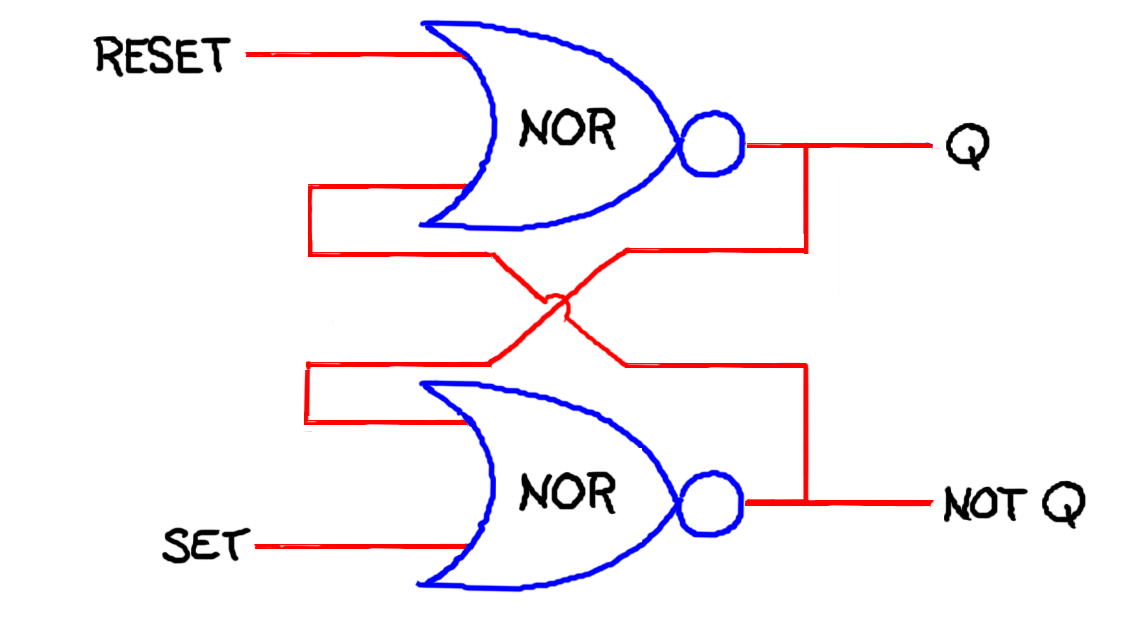
|
The D latch is used as follows. Normally, the inputs, SET and RESET, are at logic level 0. If you want to set the value of the latch to be 0, you make the RESET input go to logic level 1 for a short time. If you want to set the value of the latch to be 1, then you make the SET input go to logic level 1 for a short time.
If the SET and RESET inputs on a D latch are changing between logic levels at the same time, then all bets are off concerning what the final value of the latch will be. For this reason, there are other memory units such as the D flip-flop that use a clock signal to control when to allow the memory unit to change its internal state. I won't go into clocked logic except to say that logic gates implemented with analog circuits take time to change between the voltage levels representing binary values; it is important therefore to let the voltage levels "settle out" before making use of them by, say, storing them in memory or using them in subsequent computations.
With a D latch or a flip-flop, we can store a single bit. We use "registers" to store larger chunks of information. A register consists of some number of latches, one for every bit needed. Typically we talk of registers being 16, 32, 64 or more bits wide. We use registers to store operands, the inputs to basic operations, to store the results of operations, and to store the results of intermediate calculations. In the case of multiplication, we store the operands, the multiplicand and the multiplier, in appropriately wide registers. For reasons that will soon become apparent, we make sure that the registers for the multiplicand and the product are wide enough to accommodate the product.
So here's a simple algorithm for multiplying two n-bit numbers. We'll refer to the three registers as the multiplicand, multiplier and product registers. The multiplicand and product registers will be (2 * n) bits wide and the multiplier register will be n bits wide. The algorithm is going to modify the contents of the multiplicand and multiplier registers as well as the product register. In the following, the additions are handled by the ALU and the shifts right and left are handle by special-purpose shifting registers. The additional logic for counting from 1 to n and the implementing conditional (if-then) statement are also handled with special-purpose circuitry.
procedure multiply(multiplicand, multiplier);
    multiplicand_register := multiplicand;
    multiplier_register := multiplier;
    product_register := 0 ;
    for i = 1 to n {
        if the right most bit of the multiplier_register is 1
           then product_register := product register + multiplicand_register ;
        shift the mutiplicand_register left one bit ;
        shift the mutiplier_register right one bit ;
    }
Suppose the multiplicand is binary 10 (2) and the
multiplier is binary 11 (3) and so n = 2.
Prior to the for loop the operand and result registers are initialized:
multiplicand_register = 0010
  multiplier_register = 0011
     product_register = 0000
After the first (i = 1) iteration of the for loop, we have:
multiplicand_register = 0100
  multiplier_register = 0001
     product_register = 0010
After the second (i = 1) and final iteration of the for loop, we have:
multiplicand_register = 1000
  multiplier_register = 0000
     product_register = 0110
If we allow that primitive operations like adding two numbers or shifting a number one bit either right or left can be performed in 1 time step. How many time steps will it require to multiply two n-bit numbers? Clearly multiplication is more time consuming than addition; so it's no surprise that engineers who design computers take considerable pains to design the circuitry for performing multiplication (and division) so that it runs very fast.
So here's what I'd expect you to feel comfortable with at this stage in our discussion. We can implement basic primitive operations such as addition using logic gates. We can store information more or less permanently in latches and registers. A subset of basic arithmetic and logical operations can be carried by a single logic circuit called an arithmetic logic unit or ALU; you just feed in the necessary operands and then instruct the ALU to perform a particular operation by entering the opcode for that operation. Finally, there are some other operations, like multiplying two integers, which, while not the sort of thing directly handled by the ALU, are important enough that we build special-purpose hardware to implement algorithms that enable us to carry out these operations very fast.
By the way, we needn't restrict ourselves to operations involving only numbers. We could define primitives that operate on letters, symbols, words, sounds, images, or signals corresponding to almost anything you can imagine from brain waves to blood pressure. However numbers, it turns out, will suffice. That is once we assemble a set of basic primitives allowing us to manipulate numbers we'll be able to handle all these other forms of input by combining the numerical primitives in programs of varying complexity. There is a benefit to sticking with the numerical primitives in that we'll be able to build a compact, inexpensive device that is general purpose in that it will be able to perform any computation when provided with the appropriate programming.
Boy, that took me a lot longer than I expected. At one point, during the drive my computer went into sleep mode to conserve battery power and I couldn't coax it back awake. Now we're in a little cabin in the Maine Idyll Motor Court along Route 1 about midway between Freeport and Brunswick. We've already visited Jo's mother and sister and for the last hour or so I've been finishing this entry. It's cool in the Maine woods and so we lit a fire to take off the chill. At first it smoked up the room but then we opened a window just a crack and now the fireplace is drawing nicely. The cabin isn't too noisy despite being sandwiched in a narrow strip of woods between I95 and Route 1.
I can't get on the web (no phone in the cabin) so I can't track down web pages for the subjects that I glossed over, but I can make a good guess about what queries you would use to get more information. Search using the keywords "two's complement arithmetic" to find out more about the binary representation of negative integers and performing subtraction. Search using the keywords "computer arithmetic multiplication" for more about how to implement multiplication in hardware and "Booth's algorithm" for an improvement on the algorithm that I presented above. Most of what I know about computer hardware comes from my early training in electrical engineering and then much later reading large parts of "Computer Organization and Design" by John Hennessy and David Patterson [Hennessy and Patterson, 1997] which I highly recommend.
Tomorrow I'm busy all day with family matters and will probably be too tired to think by the time we get in the car and head home. Then for three days I have things to do in the department but I'm hoping that I can get back to this on Friday. Here's what I'd still like to cover in bridging the gap between hardware and a reasonably powerful model of computation that maps more easily onto software:
Computers are constructed from combinatorial logic (implementing logic gates, multiplexors, decoders and the like), memory (not just registers for storing operands and results but memory for storing programs and data), and finally synchronization and timing hardware that makes it all come together and dance. After today you should be convinced that we can handle most of the basic operations on data represented as binary numbers. Now we need to encode and execute programs that exercise these basic operations; we need to animate the programs.
If registers are our working memory for storing operands and intermediate results, we need additional memory for storing programs, data and those results we'd like to keep around for awhile. We need to be able to load registers with the contents of specified locations in memory, store the contents of registers in specified locations, perform operations on specified registers and store the results in other specified registers. We need to be able to perform certain operations conditionally depending on the outcome of various tests, thereby providing the basis for conditionals and loops. And, finally, we need some way of orchestrating the whole shebang so that a program executes one step at a time in accord with the programmer's intuitions of how computations should proceed.