✨ Airport Weather Analysis: Part 1 ✨
Due: Wed Feb 4 by 7pm
Overview
In this project, you will write a program that produces graphs showing the relationship between weather conditions and flight delays. You will work with realistic datasets based on ones available from the Bureau of Transportation Statistics and NOAA. The goal is to combine the available data to help users explore how weather affects airport operations.
The Datasets
You will work with three CSV files:
daily_flight_delays.csv- Daily aggregated flight statistics including departure delays, arrival delays, cancellations, and diversions for 10 major US airports.daily_weather.csv- Daily weather observations including temperature, precipitation, wind speed, and visibility.airport_codes.csv- A reference table that maps airport identifiers between the BTS and NOAA systems.
The repo contains a subdirectory named data-5-day that includes the CSV files to use for this phase of the assignment. Here's the link to clone the repo (just press skip on the first screen that asks you to join the classroom).
Assignment Tasks
Task 1: Start a fresh research journal for this assignment.
Task 2: For the first stage of this project, develop a Python program that lets the user input an airport, a date range, and a weather metric (precipitation, wind, visibility, or temperature), then produces a chart showing daily average flight delays overlaid with the chosen metric. For this version, we are not building a web interface. Instead, the program should run either from the command line or within a programming environment (such as VSCode, or another environment of your choice).
Here is an example of the chart that might be produced. Yours does not need to look exactly like this, but it should have the same basic elements:
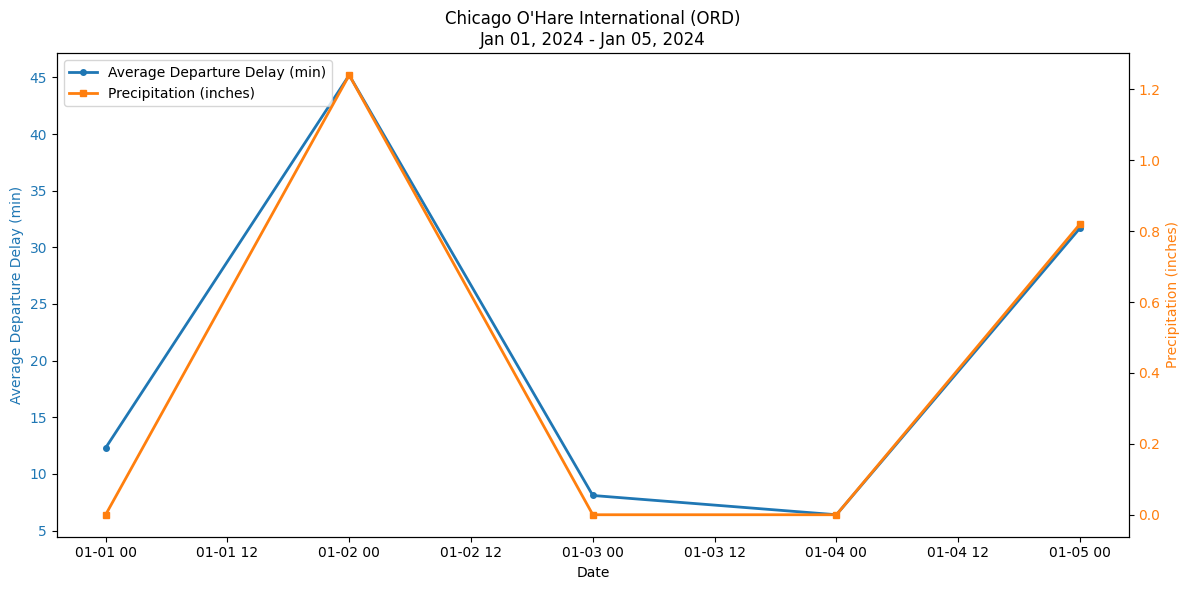
We expect that your Python program will use the input operation to get input from the user. If you run your program in a terminal window, you'll see a prompt on the command line. If you use VSCode's interactive window, the input prompt will appear as a box, perhaps near the top of your editing window (where it might be easy to miss). If you run your program and it appears to be stuck waiting for something, look up on your screen for the input prompt box.
Testing
Going forward in the course, we're going to view testing as a form of responsible software development. When you implement a project, someone else is going to use it. They are going to depend on your program working correctly. Thus, when you decide how to test your program, you should really be answering the question "how am I demonstrating to someone else that my program is sufficiently robust for them to trust?".
For this project, you might imagine that someone is trying to determine whether an airline's flight delays are due to weather conditions, not airline operations. When you think about testing, consider whether your code can be trusted to produce accurate answers towards this question.
Task 3: With that standard in mind, test your program. You should have a TESTING.md file that describes your testing strategy and gives an overview of the tests you implemented. You should also the actual testing files. We will review each other's testing files in class on Thursday.
Python Setup
If you already have Python experience: you will be working with pandas, matplotlib, and pytest for this assignment. There is a requirements.txt file in the repo that lists the necessary packages.
Here are the instructions for setting up Python for those of you who are new to it (and didn't understand the previous sentence).
At a high level, Python is a base language with a lot of optional packages or libraries. When we start a project in Python, we create some infrastructure that defines the packages we want to use. This infrastructure is called a virtual environment.
- Install Python 3.8 or higher from https://www.python.org/downloads/python.org. Make sure to check the box that adds Python to your system PATH during installation.
- Open a terminal (Command Prompt on Windows, Terminal on macOS/Linux)
- Navigate to the repository directory that you created when accepting your github classroom for this assignment
- Create a virtual environment by running the following command:
python -m venv airport_weather_env - Activate the virtual environment:
- On Windows:
airport_weather_env\Scripts\activate - On macOS/Linux:
source airport_weather_env/bin/activate - Once the virtual environment is activated, you can install the required packages using a program called pip:
pip install -r requirements.txt. Requirements.txt is a file that we have provided in the repo.
- Now, if you run a python program from this directory, it should have the libraries loaded. If you'll be running Python for other tasks, you can later deactivate the environment by running
deactivate.
Submission Instructions
Push your code regularly to the repo as you go. By the deadline, add your Claude transcripts, code, and any .md files (e.g., TESTING.md) and push to the repo. We'll collect the journals after the second phase of the assignment.