Welcome to CS111E lab! In the spirit of getting to know one another, form groups of 3-4, introduce yourselves, and answer at least one of the following questions (or make up your own):
- What is your favorite food?
- What do you do for fun?
- What is your dream location to live in?
Learning objectives
This lab will:
- give you practice reading and fixing Pyret error messages
- give you practice choosing inputs that tell you what an unfamiliar function does
- introduce the Pyret
Stringlibrary andcheckblocks - get our first taste of using an LLM on a programming-related task
You may well not get through all of this lab, and that is fine. Work with your partner, and understand the code you write rather than racing to the last task.
Getting help
In lab, flag down a TA. You do not have to be stuck to do it, and you do not have to have tried everything first — that is what they are in the room for. Ask early: a pair that spends forty minutes on a typo has lost the part of the lab that was worth doing.
Your partner counts too. Saying out loud what you think the code does is most of debugging, and it is faster than waiting.
After lab, short questions go on Ed, and anything longer is better brought to office hours.
Setup
- Open a new file in Pyret. Under
the Pirate logo at the top level, select "Choose Context", then
enter
dcic2024in the box. - Make a copy of the written answer worksheet and submit the link to it in the worksheet submission form (you can do this before filling anything in).
Part 1Practice with error messages
When writing code, it is common to encounter error messages. This does not only happen when you are learning: because programming languages are very particular about what they allow, professional programmers run into errors constantly while working on a piece of code.
Just like anything else we learn in this course, reading an error message is a skill you can practice. Let us do that now. Say we want to figure out how many digits 111 has. If we remember that string-length tells us how many characters its input has, we might run string-length(111) and see what happens:
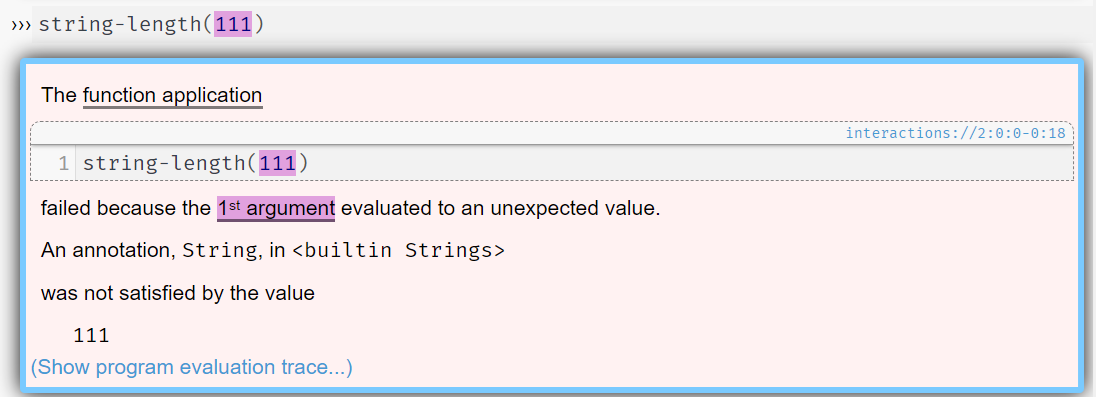
string-length(111).This message tells us that the first (and only) input to string-length should be a String, which 111 is not. It is okay if that is not immediately obvious to you from the message — as you work more with Pyret, you will pick up on the patterns in the wording. Take a few moments to work out the fix with your partner before opening the answer.
The fix
Because string-length expects a String, we can put quotes around 111 so that Pyret reads the value as a String. Run string-length("111") and see that the error is gone.
Each of the lines below produces an error. One at a time, run it in Pyret (in the interactions window is fine), discuss the error, and fix the code so that it runs. (Make assumptions about functionality or order of operations where you need to.)
- Draw a small hexagon:
regular-polygon("orange", "solid", 6, 100) - Compute a complex math expression:
num-sqrt(3*3+4*4) - Get the last two characters of a word:
string-substring("bees", 3, 5) - Get the last letter of a word:
string-char-at("Frankenstein", string-length("Frankenstein")) - Get the absolute difference of the lengths of two words:
num-abs(string-length("Frankenstein", "monster"))
Note: For some of these, you or your partner may spot the problem before you even run the code. Talk about the error message anyway. Part of the point of this task is to get used to individual error messages now, so that they are less alarming when they show up in more complicated code later.
Hint: If you get stuck, browse the Pyret documentation on the Number, String, and Image functions before asking for help.
Checkpoint
Call a TA over once you have finished Task 1.
Part 2Cracking mashers
Your younger sibling is learning how to program and has decided that it would be fun to write functions to alter messages meant for you. They have a collection of 10 functions and they run each of your messages through one of them. They refuse to tell you exactly what the functions do, but if you try to guess, they will confirm whether you are right. We'll refer to their functions as "mashers" because they destroy your message strings.
Hint: The mashers are built from functions in the Pyret String library. Open the documentation and look at how it is structured: you should be able to find a list of names of the available functions (without details) and an entry for each function showing its input/output types and what it does.
What a masher looks like under the hood
provide *
provide-types *

fun masher0(s :: String) -> String:
  doc: "returns the first letter of the string"
  string-substring(s, 0, 1)
end

check "masher0: empty str":
  masher0("") raises "index"
end

check "masher0: general":
  masher0("a") is "a"
  masher0(" ") is " "
  masher0("hello") is "h"
  masher0("1, ") is "1"
end
masher0 takes a string and returns its first letter only. The check blocks make sure it does the right thing on both empty and non-empty strings.
Getting the support code
Put this at the top of your program, before any other code:
import shared-gdrive("lab1-support-f26-e.arr", "1hu65nxLAle8Lj-ih5runEgTDPmI_3e5I") as supportThat gives you access to all of the mashers. The masher functions are named
support.masher1,
support.masher2,
support.masher3,
...
support.masher10
They take Strings as input — support.masher1("mystery") — and produce a mashed result.
Work through the ten mashers. For each one, try inputs until you can say what it does. Keep a record (in your file) of which Strings you used to test each masher. You should be ready to explain your choices to a TA; the strings will also be useful in a later activity.
As you figure out each one, write your own function guess1, guess2, etc that you believe makes the same modification to a given string. To see if you are correct, pass the name of your guess function to the corresponding checker function as follows:
support.test-masher1(guess1)More hints
- Vary your inputs, and think about why that helps. In what ways can a String vary?
- Think about where you see strings of text in the wild — a book, a report. What symbols show up there besides letters?
- Strings in Pyret are 0-indexed: the first character is at index 0, not 1.
- At least one masher is the composition of two or more of the earlier ones — it applies one masher to the string and then a different one to that result.
Checkpoint
Call a TA over three times as you work through Task 2:
- after you have finished mashers 1–4;
- after you have finished mashers 5–8;
- once you have finished mashers 9–10.
Stop for a moment and reflect on how you approached this problem: how did you go about coming up with test inputs at the beginning? Did your approach change, or did you learn any techniques that you tried on the later examples? Write some preliminary instructions, as if you were teaching a classmate who missed lab how to approach this.
Put your answers in the worksheet that you generated at the beginning of lab.
Are you smarter than an LLM?
111E hopes to help you build understanding of how the capabilities of humans and LLMs or Agents differ. To that end, let's see how Gemini would do with different versions of figuring out how the mashers work. Open Gemini via this link.
Give Gemini the "your younger sibling" paragraph from above (without the hint) and ask it to generate a collection of strings that you could give to test mashers. Look at the set of strings it gave back. How do these strings differ from yours (think about traits of the strings, not their specific content)? How effective do you think those strings would be?
Now tell Gemini about the hint, making sure to include the String library URL. Is the collection of strings noticeably different? Can you describe how? Part of what we're doing here is warming up on critiquing what agents output, so it's worth some of your time to try to characterize what Gemini came up with again.
Try one more time, this time with the instructions you wrote down in the previous reflection task. Does Gemini perform any better?
Write down your observations about how Gemini did in each case (in the worksheet)
Challenge: write your own
Now that you are a masher expert, make one of your own and let your classmates take a crack at it.
Optional
Create a new Pyret file. In it, write a masher function in the style of the ones you have been testing (follow the structure shown in Step 1 above, but you can use any function name you like). Then share it on the masher
swap spreadsheet: press Publish in your Pyret file, copy the line that begins with import shared-gdrive, and add it to the sheet.
Note: If you do not see the Publish button, make sure you are logged into Pyret with your Brown Google account.
Optional
Import another group's masher from the swap spreadsheet, using the same form of import you used for the support file. Call a TA over if you get stuck.
Optional
Write a function called our-guess that tries to capture the behavior of the other group's new-masher. When you think it works, check with the group that wrote the masher.
Comments or concerns?
If you have comments or concerns, submit them on the anonymous feedback form. Sign in with your Brown Google account to open it; your email address is not recorded.