Overview
In this assignment, we'll use images of flags to practice three skills: writing Pyret code, planning computations, and describing the properties of images. Along the way, we'll use LLMs to assist with checking our work.
Learning objectives
After this assignment, you should be able to:
- Navigate the Pyret documentation to find an operation you have not been shown
- Compose Pyret image operators into a single expression that produces a picture
- Decompose a picture into the shapes it is built from, and write that plan down in words before coding it
- Describe the key features of an image sufficiently precisely that an LLM generate code to build your image
- Describe the key features of an image sufficiently precisely that an LLM can use your descriptions to separate valid images from poor ones
AI and collaboration policy for this assignment
You may work with other human students as much as you want on this assignment. The point of it is to make sure everyone can use Pyret, write a simple program, and hand work in — so ask each other things freely. That said, we expect everyone to actually do the assignment rather than hand in what someone else wrote; you will be in trouble on later assignments otherwise.
Except where we tell you otherwise, you should not use AI tools on this assignment. We want you to practice working with language documentation instead. Yes, in the real world, you'd likely use AI to look up information, but by working with it by hand, you'll develop a sense of what sort of information such documentation holds and how it is organized (which could help with structuring your own project documentation later).
Setup
- In Pyret, make a copy of the
starter
file, saving it as
hwk1-code.arr - Make a copy of the written answer worksheet and submit the link to it in the worksheet submission form (you can do this before filling anything in).
- Download the files
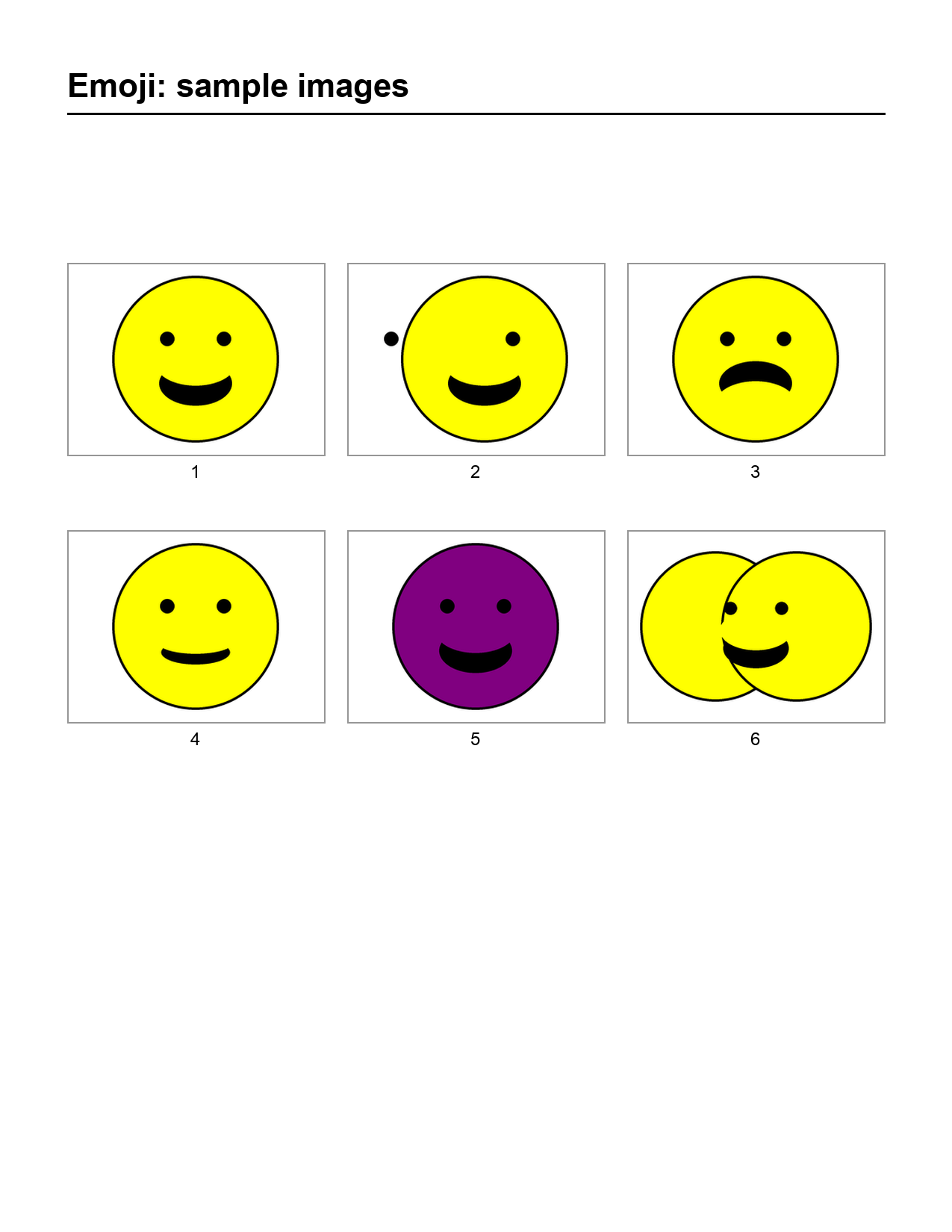
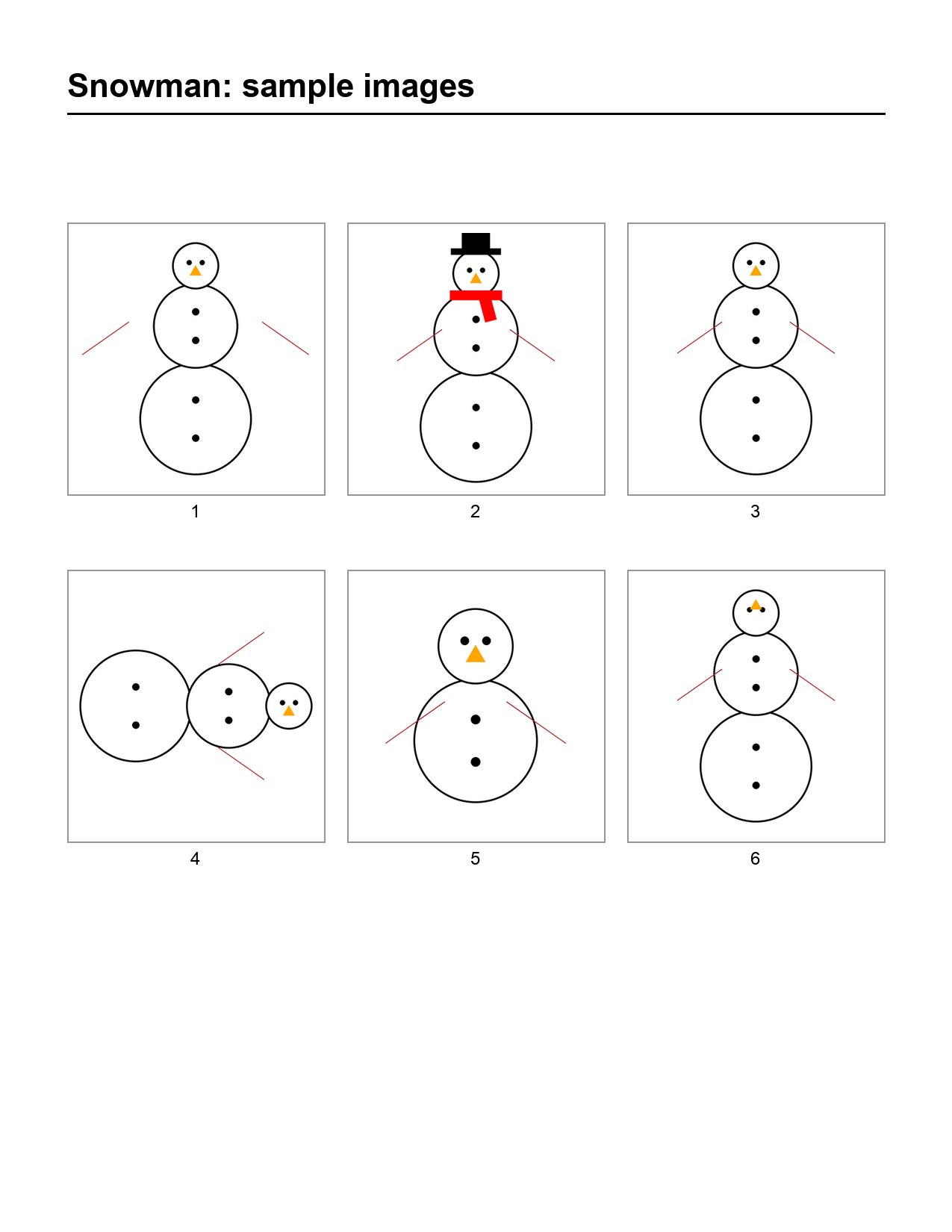
emoji-samples.pngandsnowman-samples.pngto your computer. We recommend having a folder/directory on your laptop or in your account for your CSCI 0111E work, and putting these in a subfolder named homework1 (or similar).
Do not put your name in your Pyret/.arr files, so we can grade it anonymously.
Resources
Have these open while you work:
- The CPO guide — how to use the Pyret programming environment, beyond the demo in class.
- The image documentation — this is the one you will live in. When you wish you had an operation we did not cover in class, look here: read the operation names and their descriptions and see whether one of them does what you want.
- The list of color names, if you want to be precise about a shade.
The full Pyret documentation is also reachable from the Pirate button in the top left corner of code.pyret.org. If something you found in the documentation does not work the way you expected, post about it on Ed.
Part 1Generating Flags
In this part you will build four flags: Madagascar, Türkiye, Saint Lucia, and Greenland. Each folded description tells you the colors, so you can work out the shapes.
Set up your code so that the four flags are the output on the right hand side when we press the run button, and nothing else is — no sub-images, no numbers, no strings.
Generate the flag of Madagascar.
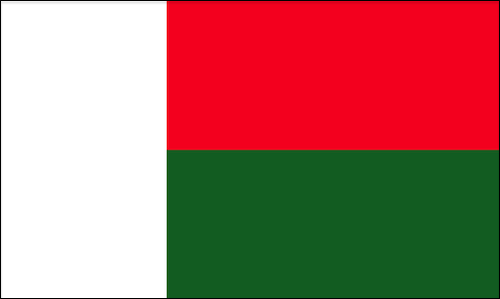
Click for a description of colors in the image
The right portion of the image is evenly split into two rectangles, one on top of the other. The left rectangle is white. The top right rectangle is red. The bottom right rectangle is dark green.
Generate the flag of Türkiye.
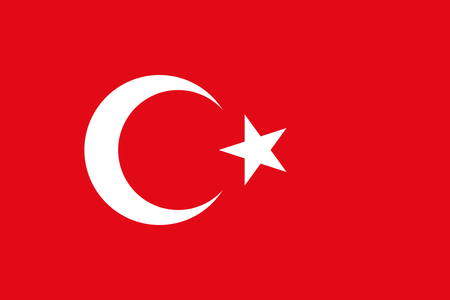
Click for a description of colors in the image
The crescent and star are white. The background is red.
Generate the flag of Saint Lucia.

Click for a description of colors in the image
The foreground triangle is yellow. The middle triangle is black. The back triangle, which reads as a border, is white. The flag background is light blue.
Generate the flag of Greenland.

Click for a description of colors in the image
The bottom rectangle and the upper half-circle are red. The top rectangle and the bottom half-circle are white.
Note: Use the solid color white to fill shapes where a flag is white. Do not depend on the Pyret website's background to fill in the white areas of your image.
Part 2Practicing Program Planning
Most of the time, producing code that works requires outlining and planning first; this is important whether you are writing code by hand or working with an agent. Planning is what lets you take a problem apart in a way that heads off bugs rather than debugging them later. So before coding anything here, we want you to practice writing the outline.
Pick one of the two images below. Without coding it, write a list of steps and action items describing, in words, how to recreate your image starting from basic shapes — imagine you are getting a child to draw it from your instructions. Use any terms you like: you do not have to stick to the names of Pyret operations, or to concepts we have covered.
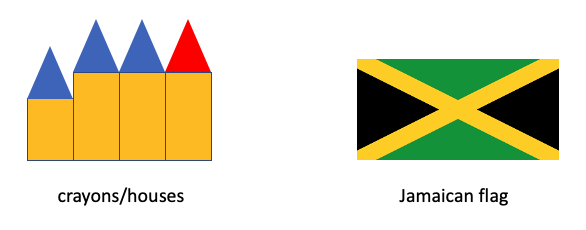
Write your steps in the Programming Planning area of the Google Doc Worksheet. These are steps in prose, not code. There is no lower or upper limit on how many steps you write. Aim for instructions clear enough that someone who has never seen the image could reproduce it.
Now we want to test the quality of your plan. Let's see whether Gemini can follow it to reproduce a reasonable version of the original image (don't worry about having the exact same colors and sizes, but a human should recognize it as essentially the same image). Use this link to
access Gemini (the link is preloaded with information about Pyret). Give it your description and ask it to produce a Pyret expression to generate an image according to each plan in turn. Copy the generated expression to your hwk1-code.arr file and run your code to see how well it did. If the resulting image is significantly off, adjust your plan description until the output is reasonably close to what you wanted (don't worry about getting the colors or sizes exact at this stage).
Have Gemini create a Google Doc with your transcript and paste the url into the appropriate space at the top of your hwk1-code.arr file. See the the software section of the resources
page for instructions for getting the transcript.
Part 3Practicing Describing Properties
The previous task had you describe a
For example, we could describe a flag of Madagascar as:
- It has a tall white rectangle about 1/3 the width of the flag
- To the right of the white rectangle, it has two equally-sized rectangles stacked on top of one another. The top one is red and the bottom one is green
We could use this checklist to confirm that everyone's Madagascar flag images for this assignment were valid. But we aren't going to have humans do this checking -- we're going to ask Gemini to do it! Let's try this on different images.
Write a checklist to describe the criteria for a smiling-face emoji like the following; put the checklist in your worksheet file. 
Open a new Gemini session (if we ask Gemini to do too much in one session, it can lose track of what you're asking it to do). Give it your checklist and the emoji-samples.png file containing six "emoji" images. Ask Gemini which images from the file meet your criteria. Experiment with different criteria to see how its performance changes. When you have a checklist that you believe suffices for Gemini to distinguish valid from invalid images, put the final checklist in your worksheet (or say "no change" if your first attempt worked sufficiently well).
Also get a Google Doc for your Gemini transcript, share it with kathryn_fisler@brown.edu, and put the URL at the top of your Pyret file.
Giving the sample images to Gemini
There is a + sign at the bottom-left of your chat window. Click that, then select "upload files" to add the image file.Repeat the previous task (including starting a new Gemini session), but this time for a snowman image like the following. The sample images are at snowman-samples.png 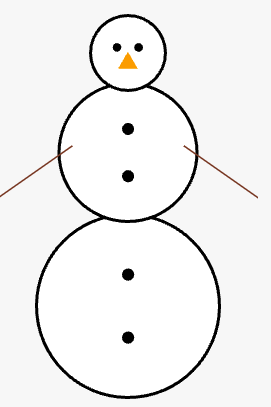
Fill in the question in the worksheet about what you have learned from working on this assignment. This question doesn't get graded as long as you've filled it in. Writing down what you've learned is good for you as a learner and for us as staff trying to understand the impact of this assignment.
Grading
As this is the first homework, it will be only lightly graded (and hence count only lightly in final course grades). We want to give you space to get comfortable with Pyret and the ways we submit work in this course.
On Part 1 we are looking for the right shapes, in roughly the right places, at roughly the right sizes and orientations. Specifically:
- We do not care about exact positioning, size ratios, borders, or angles.
- We do not care about specific shades.
"green"is fine even though it is brighter than the green on the flag. - We are not grading style on this assignment. Most of the style guide will not even make sense yet.
On Task 5 we are looking for steps someone could actually follow: each one an action, in an order that works, that generate the whole image.
On Task 7 and Task 8, we are looking to see how well your description captured the image. We will run your descriptions against a larger collection of valid and invalid images so you can get some feedback on your descriptions.
Getting help
Short questions go on Ed. Check the pinned FAQ for this assignment first — someone has usually asked already. Do not post solution code, or anything close to it, where other students can see it.
For a longer question, or to talk something through with a person, come to office hours.
Handin
Hand in this file:
hw1-code.arr
Make sure you have put links to any required chat transcripts at the top of your file. Submit to Gradescope. You may submit as many times as you like before the deadline; we grade the last submission.
Comments or concerns?
If you have comments or concerns, submit them on the anonymous feedback form. Sign in with your Brown Google account to open it; your email address is not recorded.