

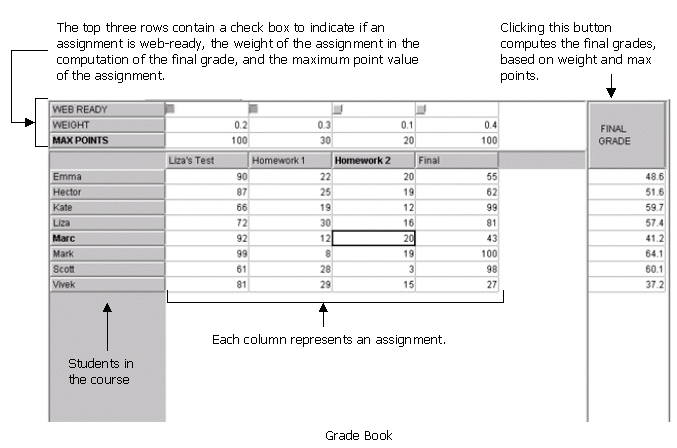
The Grade Book stores the grades for all students in the course. In this section, the user can add and edit grades for the various class assignments as well as view up-to-date "Final Grades" for each student based on the given "weights" of each assignment. The following is a diagram of the grade book:
Adding and Changing a Grade
- Click on the cell of the student and assignment whose grade you want to modify.
- Enter the grade you would like to add. If you are changing, rather than adding, a grade -- once you type in the new grade, the old grade will disappear.
- Press enter to complete the grade edit.
- You may only enter a number grade - no letter grades will be accepted.
- You may enter either an integer or a decimal number.
The maximum grade for each assignment must be assigned in order to calculate the final grades. These cells can be found at the top of the Grade Book, above the names of each assignment. Again, these may be integers or decimals; they may not be letter grades. You can enter maximum points in the same manner as described in Adding and Changing a Grade.
Setting the Assignment Weights
In order to calculate final grades, each assignment must be given a weight. A weight is the percentage of the final grade dependent on the grade for a particular assignment. The weight must be entered in decimal form. For example, if the grades for the assignment called "HW1" should count as twenty percent of the final grade, the “WEIGHT” cell for assignment HW1 should be filled in as "0.2." Entering “20” is incorrect. Enter weights in the same manner as described in Adding and Changing a Grade.
Final Grade
In order to calculate each student's final grade for the course, each assignment must first be assigned “MAX POINTS” as well as “WEIGHT.” (See above instructions.) Once this is done, any grade additions or changes (as well as changes in WEIGHT or MAX POINTS) will be automatically reflected in the Final Grades. The Final Grades are calculated using the formula below:

Web-Ready
The web-ready option allows the user to make the grades for particular assignments available on the Internet for students to view. For more information on how to make an assignment "web-ready," see web functionality.